FirstPass: Scaling Empathy with Human-in-the-Loop AI
Using AI to help volunteers translate faster, without losing the human touch
2024
Tarjimly is the "Uber for Translation," connecting 60,000+ volunteers with refugees and aid workers. But unlike calling an Uber, our users are often in crisis—medical emergencies, border crossings, or legal disputes.
Role:
Senior Product Designer
Timeline:
3 Months
Teams:
Tarjimly Product and Google Engineering Teams
The Friction
Speed matters, but accuracy is everything. Tarjimly connects refugees with volunteer translators in real time. In a crisis, every second counts. However, we noticed that volunteers often felt stuck when they received a complex legal document or a long voice note. Starting a translation from zero takes a lot of time and effort.
On the other side, refugees sometimes struggled to type out exactly what they needed. They relied on photos of documents or voice recordings, which are harder for volunteers to process quickly.
The Challenge
How can we use AI to do the heavy lifting (the "First Pass") while keeping the human accuracy that is so critical for medical and legal conversations?
The Solution: FirstPass
A "Human-in-the-Loop" AI. We designed FirstPass, a set of AI tools that instantly draft translations from text, images, audio, and PDFs. The core philosophy is Responsible AI Innovation.
We didn't want to replace the human; we wanted to supercharge them. The AI provides a rough draft, but the interface forces the volunteer to review, edit, and approve the translation. This unique combination ensures we get the speed of AI with the cultural sensitivity and safety of a human expert.
Feature A: Translation from Pictures (OCR)
Refugees often send photos of physical letters, street signs, or medical prescriptions. Typing this text out manually is slow and tedious.
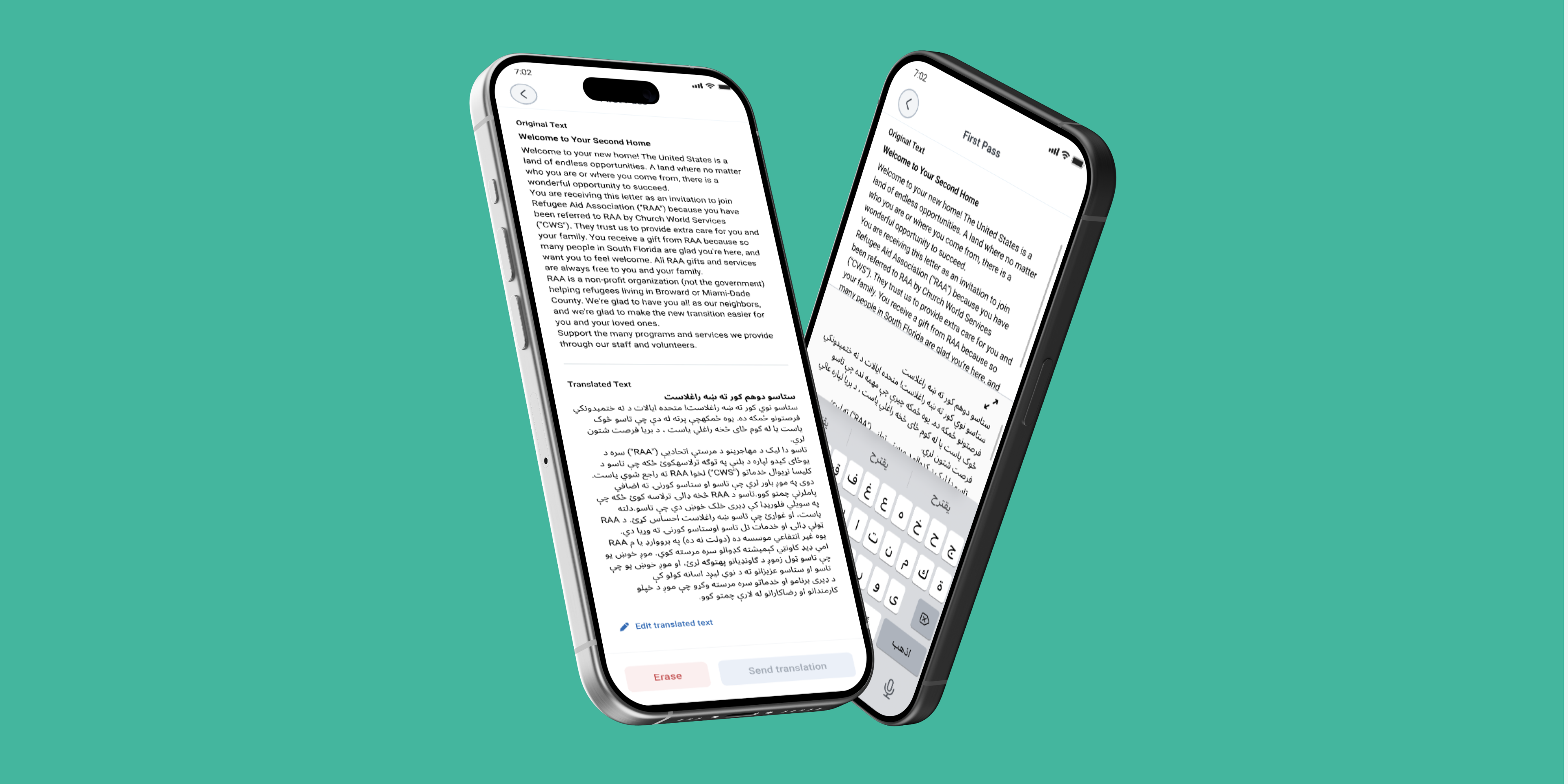
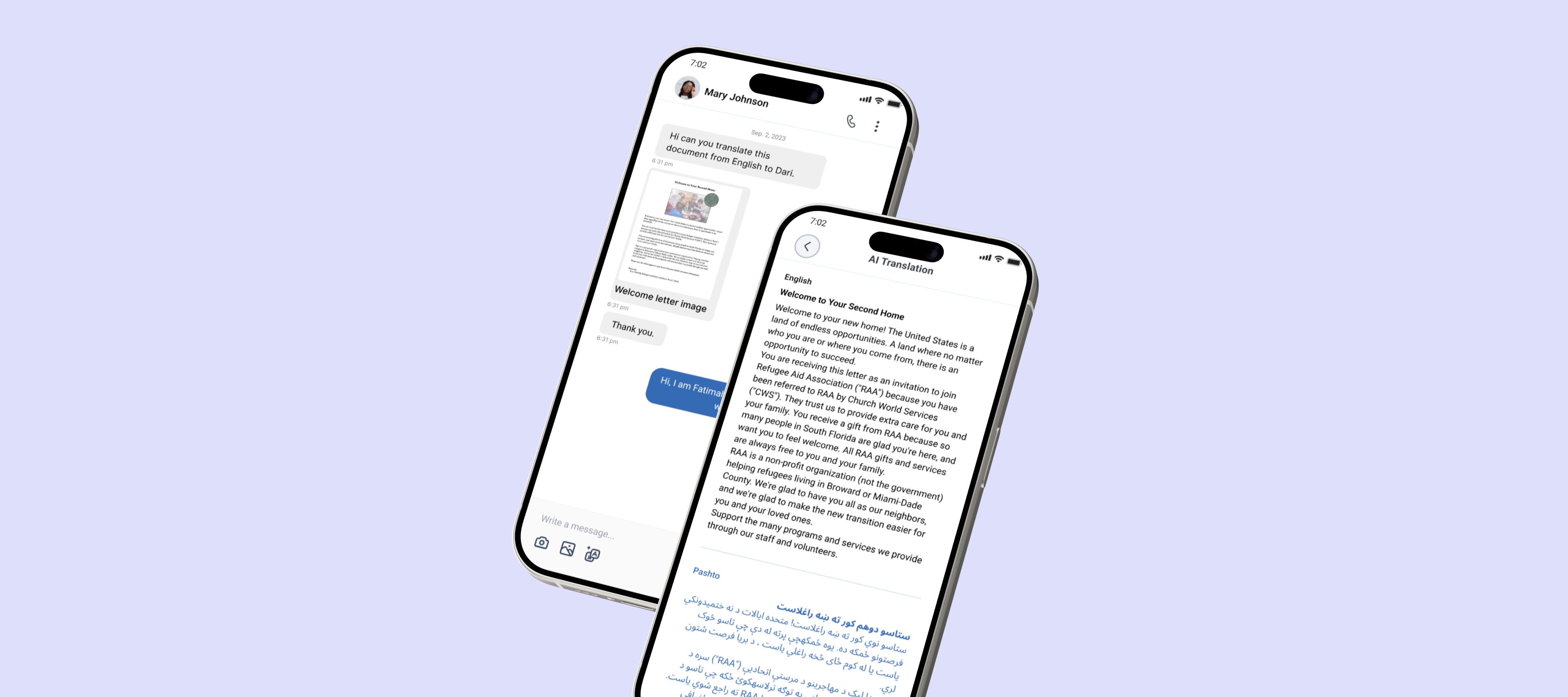
- The Flow: The user uploads an image. The system scans it, pulls out the text, and translates it automatically.
- The UX Detail: We designed a split view so the user can see the original text and the translated text side by side. This makes it easy to spot errors quickly.
Feature B: Translation from Audio
For users with low literacy or people who are on the move, voice notes are often the easiest way to communicate.
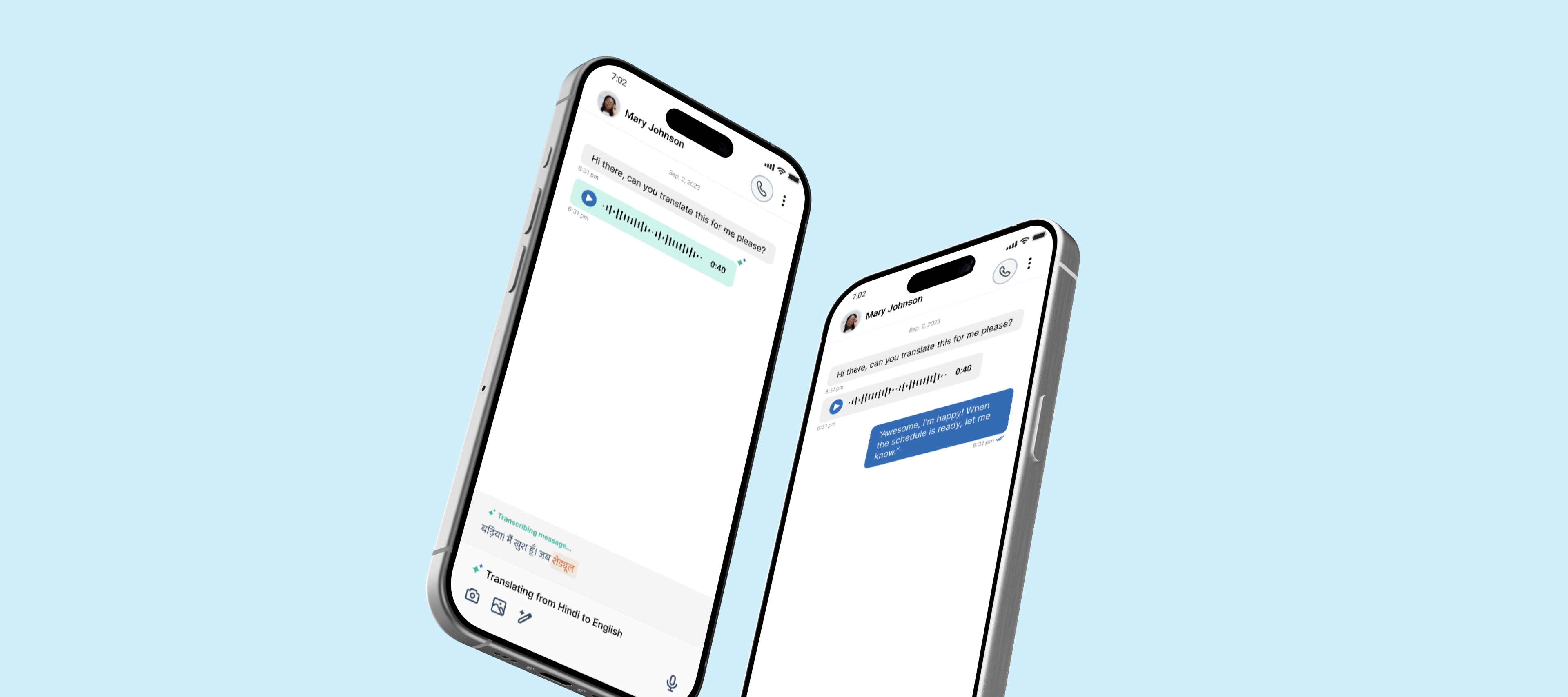
- The Flow: A long press on an audio bubble reveals a "Translate text" option. The system turns the audio into text first, then translates it.
- The UX Detail: We hid this feature under a long press on purpose. We didn't want to clutter the chat or distract from the human connection unless the tool was actually needed.
Feature C: Translation from PDF
Humanitarians frequently deal with asylum applications and legal forms in PDF format.
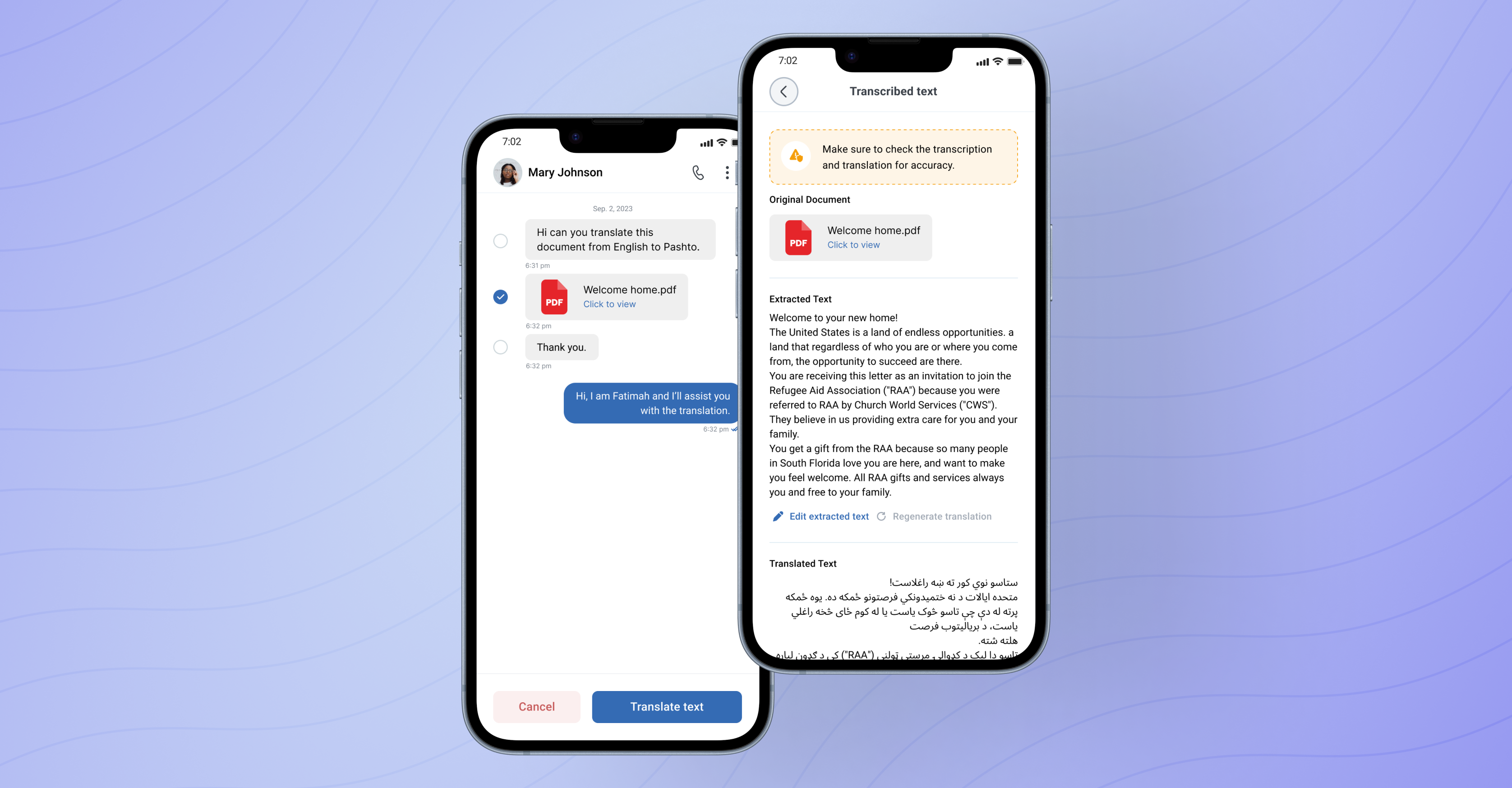
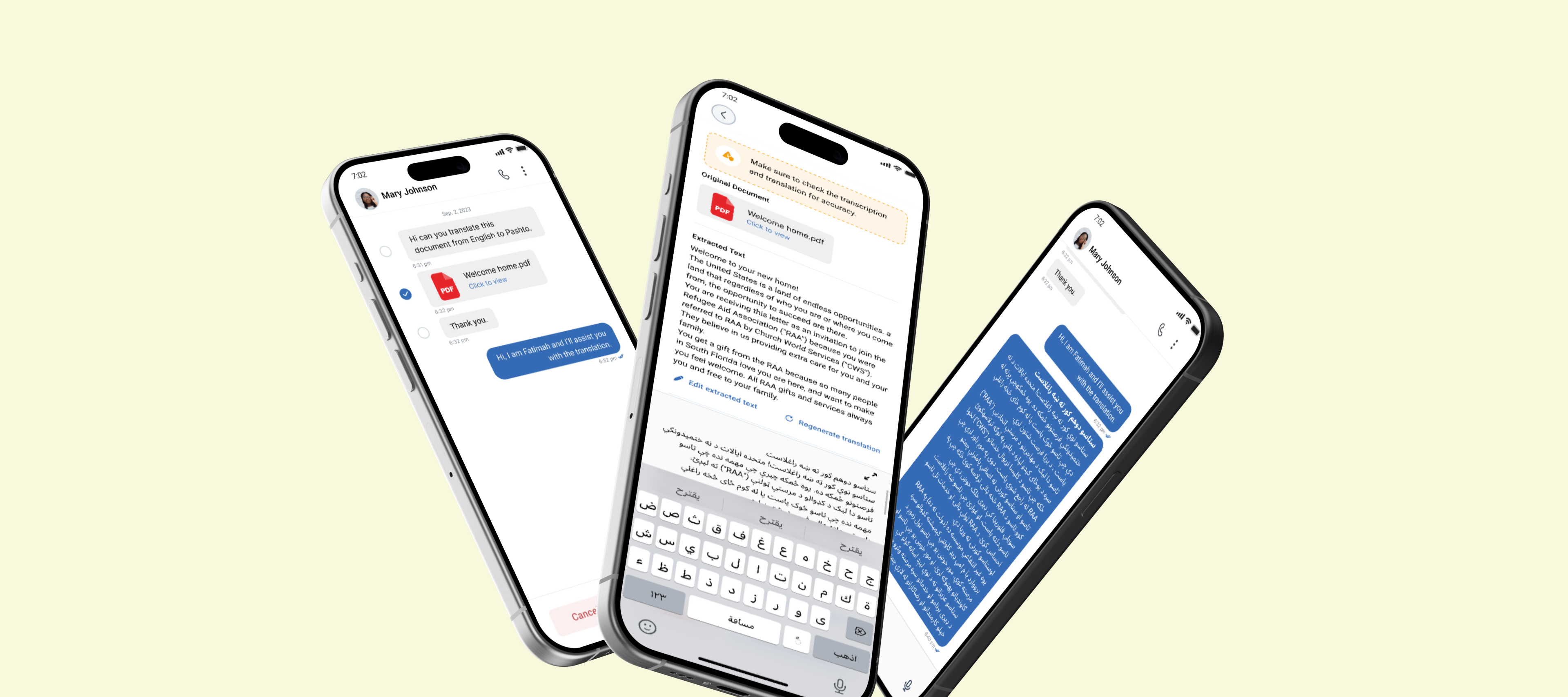
- The Flow: Users upload a PDF. FirstPass reads the document structure and provides a text block of the translation.
- The UX Detail: We focused heavily on the "Review" state here. Before the file goes back to the beneficiary, the volunteer sees a clear preview to ensure the context of the document is still correct.
Feature D: Text-to-Text Drafts
For standard messages, volunteers can get a quick suggestion to keep the conversation moving.
- The Flow: Selecting a message bubble offers an instant translation draft.
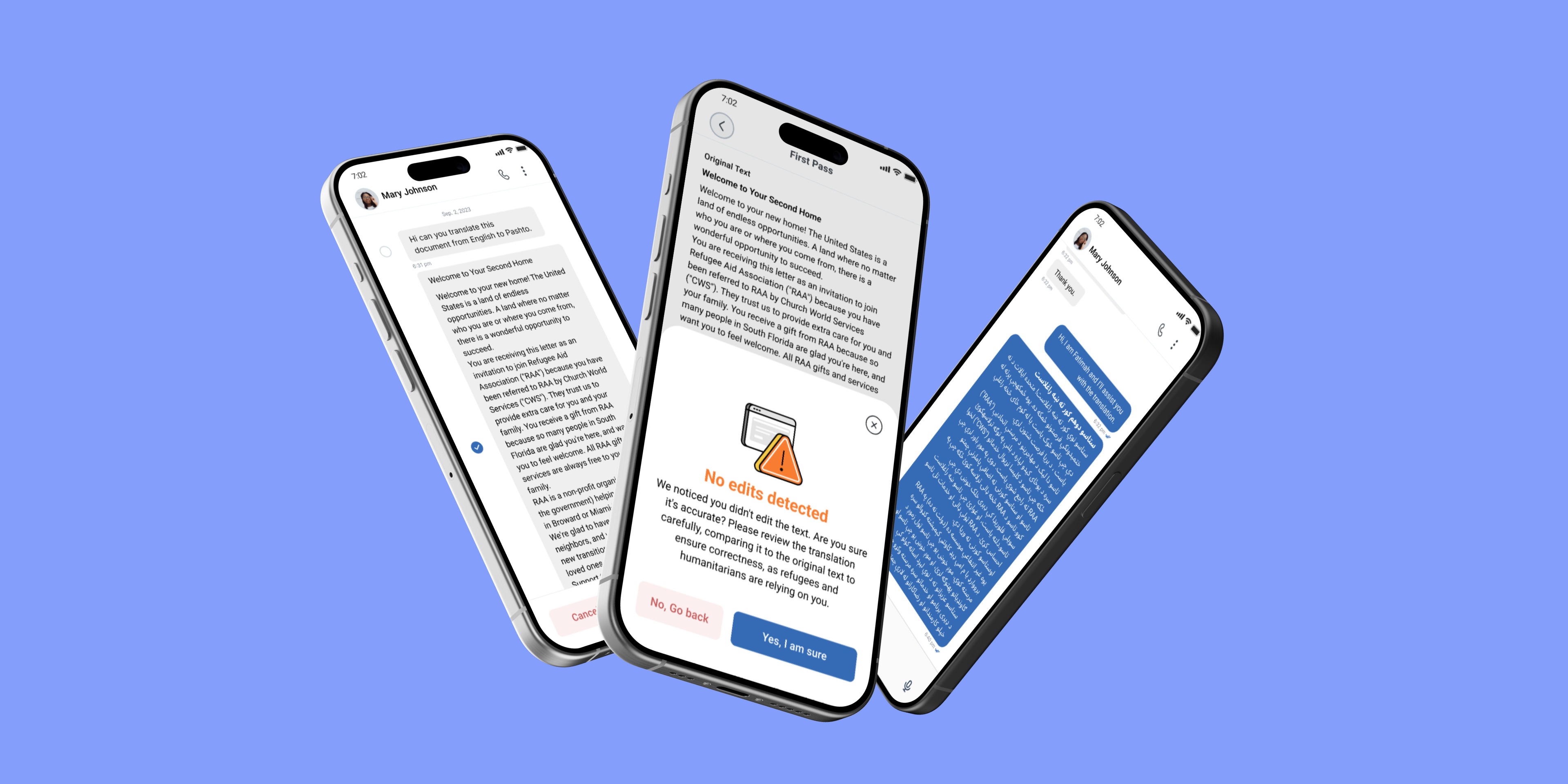
- The UX Detail: The "Edit" screen is the most important part of this flow. We added a clear note that says: "Please review the translation carefully. AI can make mistakes." This small bit of friction reminds the volunteer that they are in charge, not the machine.
The Impact
By launching FirstPass, we didn't just make things faster; we actually made them better.
Speed
Research showed that FirstPass increased translation speed by an average of 3x (and up to 5x for some languages) compared to pure human translation.
Accuracy
Surprisingly, using FirstPass led to a statistically significant improvement in accuracy. It turns out that humans correct AI better than they translate from scratch.
The "Data Hub" Effect
Every time a volunteer corrects the AI's draft, that data helps train our models. This creates a feedback loop that specifically improves low-resource languages that big tech companies often ignore.
FirstPass: Scaling Empathy with Human-in-the-Loop AI
Using AI to help volunteers translate faster, without losing the human touch
2024
Tarjimly is the "Uber for Translation," connecting 60,000+ volunteers with refugees and aid workers. But unlike calling an Uber, our users are often in crisis—medical emergencies, border crossings, or legal disputes.
Role:
Senior Product Designer
Timeline:
3 Months
Teams:
Tarjimly Product and Google Engineering Teams
The Friction
Speed matters, but accuracy is everything. Tarjimly connects refugees with volunteer translators in real time. In a crisis, every second counts. However, we noticed that volunteers often felt stuck when they received a complex legal document or a long voice note. Starting a translation from zero takes a lot of time and effort.
On the other side, refugees sometimes struggled to type out exactly what they needed. They relied on photos of documents or voice recordings, which are harder for volunteers to process quickly.
The Challenge
How can we use AI to do the heavy lifting (the "First Pass") while keeping the human accuracy that is so critical for medical and legal conversations?
The Solution: FirstPass
A "Human-in-the-Loop" AI. We designed FirstPass, a set of AI tools that instantly draft translations from text, images, audio, and PDFs. The core philosophy is Responsible AI Innovation.
We didn't want to replace the human; we wanted to supercharge them. The AI provides a rough draft, but the interface forces the volunteer to review, edit, and approve the translation. This unique combination ensures we get the speed of AI with the cultural sensitivity and safety of a human expert.
Feature A: Translation from Pictures (OCR)
Refugees often send photos of physical letters, street signs, or medical prescriptions. Typing this text out manually is slow and tedious.
- The Flow: The user uploads an image. The system scans it, pulls out the text, and translates it automatically.
- The UX Detail: We designed a split view so the user can see the original text and the translated text side by side. This makes it easy to spot errors quickly.
Feature B: Translation from Audio
For users with low literacy or people who are on the move, voice notes are often the easiest way to communicate.
- The Flow: A long press on an audio bubble reveals a "Translate text" option. The system turns the audio into text first, then translates it.
- The UX Detail: We hid this feature under a long press on purpose. We didn't want to clutter the chat or distract from the human connection unless the tool was actually needed.
Feature C: Translation from PDF
Humanitarians frequently deal with asylum applications and legal forms in PDF format.
- The Flow: Users upload a PDF. FirstPass reads the document structure and provides a text block of the translation.
- The UX Detail: We focused heavily on the "Review" state here. Before the file goes back to the beneficiary, the volunteer sees a clear preview to ensure the context of the document is still correct.
Feature D: Text-to-Text Drafts
For standard messages, volunteers can get a quick suggestion to keep the conversation moving.
- The Flow: Selecting a message bubble offers an instant translation draft.
- The UX Detail: The "Edit" screen is the most important part of this flow. We added a clear note that says: "Please review the translation carefully. AI can make mistakes." This small bit of friction reminds the volunteer that they are in charge, not the machine.
The Impact
By launching FirstPass, we didn't just make things faster; we actually made them better.
Speed
Research showed that FirstPass increased translation speed by an average of 3x (and up to 5x for some languages) compared to pure human translation.
Accuracy
Surprisingly, using FirstPass led to a statistically significant improvement in accuracy. It turns out that humans correct AI better than they translate from scratch.
The "Data Hub" Effect
Every time a volunteer corrects the AI's draft, that data helps train our models. This creates a feedback loop that specifically improves low-resource languages that big tech companies often ignore.
FirstPass: Scaling Empathy with Human-in-the-Loop AI
Using AI to help volunteers translate faster, without losing the human touch
2024
Tarjimly is the "Uber for Translation," connecting 60,000+ volunteers with refugees and aid workers. But unlike calling an Uber, our users are often in crisis—medical emergencies, border crossings, or legal disputes.
Role:
Senior Product Designer
Timeline:
3 Months
Teams:
Tarjimly Product and Google Engineering Teams
The Friction
Speed matters, but accuracy is everything. Tarjimly connects refugees with volunteer translators in real time. In a crisis, every second counts. However, we noticed that volunteers often felt stuck when they received a complex legal document or a long voice note. Starting a translation from zero takes a lot of time and effort.
On the other side, refugees sometimes struggled to type out exactly what they needed. They relied on photos of documents or voice recordings, which are harder for volunteers to process quickly.
The Challenge
How can we use AI to do the heavy lifting (the "First Pass") while keeping the human accuracy that is so critical for medical and legal conversations?
The Solution: FirstPass
A "Human-in-the-Loop" AI. We designed FirstPass, a set of AI tools that instantly draft translations from text, images, audio, and PDFs. The core philosophy is Responsible AI Innovation.
We didn't want to replace the human; we wanted to supercharge them. The AI provides a rough draft, but the interface forces the volunteer to review, edit, and approve the translation. This unique combination ensures we get the speed of AI with the cultural sensitivity and safety of a human expert.
Feature A: Translation from Pictures (OCR)
Refugees often send photos of physical letters, street signs, or medical prescriptions. Typing this text out manually is slow and tedious.
- The Flow: The user uploads an image. The system scans it, pulls out the text, and translates it automatically.
- The UX Detail: We designed a split view so the user can see the original text and the translated text side by side. This makes it easy to spot errors quickly.
Feature B: Translation from Audio
For users with low literacy or people who are on the move, voice notes are often the easiest way to communicate.
- The Flow: A long press on an audio bubble reveals a "Translate text" option. The system turns the audio into text first, then translates it.
- The UX Detail: We hid this feature under a long press on purpose. We didn't want to clutter the chat or distract from the human connection unless the tool was actually needed.
Feature C: Translation from PDF
Humanitarians frequently deal with asylum applications and legal forms in PDF format.
- The Flow: Users upload a PDF. FirstPass reads the document structure and provides a text block of the translation.
- The UX Detail: We focused heavily on the "Review" state here. Before the file goes back to the beneficiary, the volunteer sees a clear preview to ensure the context of the document is still correct.
Feature D: Text-to-Text Drafts
For standard messages, volunteers can get a quick suggestion to keep the conversation moving.
- The Flow: Selecting a message bubble offers an instant translation draft.
- The UX Detail: The "Edit" screen is the most important part of this flow. We added a clear note that says: "Please review the translation carefully. AI can make mistakes." This small bit of friction reminds the volunteer that they are in charge, not the machine.
The Impact
By launching FirstPass, we didn't just make things faster; we actually made them better.
Speed
Research showed that FirstPass increased translation speed by an average of 3x (and up to 5x for some languages) compared to pure human translation.
Accuracy
Surprisingly, using FirstPass led to a statistically significant improvement in accuracy. It turns out that humans correct AI better than they translate from scratch.
The "Data Hub" Effect
Every time a volunteer corrects the AI's draft, that data helps train our models. This creates a feedback loop that specifically improves low-resource languages that big tech companies often ignore.